Buffalo Spins App and Mobile Casino
 Available in GB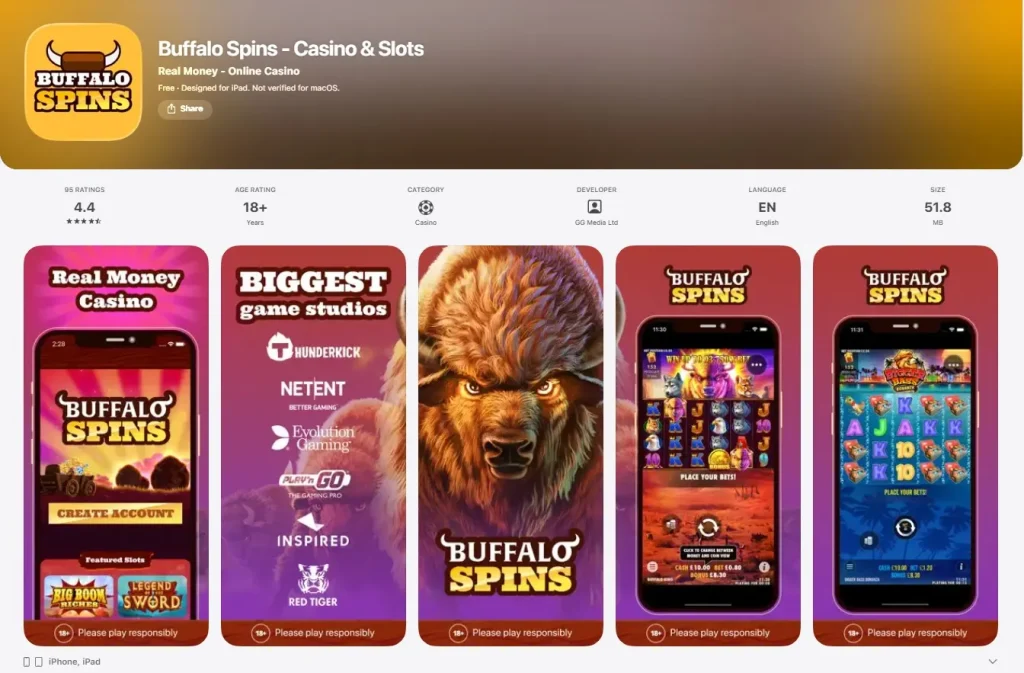
Buffalo Spins UK
Buffalo Spins has a verified UK iOS app listed in Apple’s App Store for iPhone and iPad, and the casino can also be used through a mobile browser. The available evidence does not verify a native Android app, so native Android availability remains unconfirmed and third-party APK downloads or sideloading are not recommended.
That creates a simple platform split: iPhone and iPad users have a verified native-app route as well as browser access; other mobile users can use the browser route where supported, while Android-native availability remains unconfirmed. For most players, the practical decision is therefore not “app or no mobile”, but whether the verified iOS app offers enough convenience to prefer it over the browser.
Table of Contents
- Is there a Buffalo Spins app?
- Mobile browser access
- What the iOS listing confirms
- Android app status
- Games on mobile
- Mobile deposits and account access
- How mobile withdrawals work
- App versus browser: which route makes more sense?
- Useful mobile checks before depositing
- Mobile overall view
- Buffalo Spins mobile FAQ
- Buffalo Spins mobile: iOS certainty, browser flexibility
- Recommend
Is there a Buffalo Spins app?
Yes, for iOS. The UK Apple App Store currently lists Buffalo Spins – Casino & Slots from GG Media Limited. The listing supports iPhone and iPad and identifies the product as a real-money casino app. This is direct store-level evidence of a native iOS application rather than a generic claim that the website is “mobile friendly”.
The Android position is different. A native Android app was not established from a sufficiently reliable store listing. Some third-party pages make broader app claims, but that is not enough to treat Android availability as verified. The supported answer is narrow: iOS app verified; Android native app not verified.
| Platform | Current status | Practical route |
|---|---|---|
| iPhone | Native app verified | UK App Store app or mobile browser |
| iPad | Native app verified | UK App Store app or browser |
| Android | Native app unverified | Use the mobile website rather than relying on an unverified APK claim |
| Other mobile devices | Browser access supported at category level | Use a current standards-compliant browser and check game compatibility |
Mobile browser access
Independent current sources support mobile-browser play at Buffalo Spins. That matters because browser access is a separate product route from a native app. You do not need to turn every phone into an app-installation question: a mobile browser can provide access to the account, casino lobby and supported games without a store download.
Browser access can also be the cleaner option when you use multiple devices, do not want another installed app, or need a fallback if an app version becomes outdated. The important limitation is that no performance benchmarks are stated without supporting measurements. Connection quality, device age, browser version and the specific game can all affect loading and responsiveness.
If you are deciding between browser and app, test the tasks that matter to you: sign-in, opening the game lobby, finding account controls, reaching the cashier and returning to a game after navigation. Those practical checks tell you more than a generic claim that one route is “faster”.
What the iOS listing confirms
The current UK App Store listing identifies Buffalo Spins as an 18+ casino app, shows compatibility with iPhone and iPad, and names GG Media Limited as the provider. It also describes slots, table games, promotions and payment access within the mobile experience. The important point is the existence and platform support of the app rather than every marketing statement in the store description.
The listing is useful evidence because app-store presence is easy to confuse with mobile-browser compatibility. A casino can work on a phone without maintaining a native application. Here, the iOS route is independently observable through Apple, so it can be described directly.
App-store listings can change, however. Compatibility requirements, version history and even availability can be updated over time. Use the live listing as the final check before expecting a particular device or operating-system version to be supported.
Android app status
A current official native Android app listing has not been confirmed for Buffalo Spins. That does not block Android access because the casino can be used through a mobile browser, which is a different route from installing an app.
Third-party APK files should not be treated as equivalent to an official store listing. Browser access already provides a direct way to use the site without adding the software-installation risk that comes with downloading an app package from an unrelated mirror.
For now, Android users are best served by judging Buffalo Spins as a browser-based mobile casino and checking whether an official native listing appears later if app installation is important to them.
Games on mobile
Buffalo Spins’ wider casino product includes a large slot library plus bingo, live casino and table-game categories. Mobile access gives you a route into that broader catalogue, but individual titles should not be assumed to behave identically on every device.
For slots, the key practical checks are screen fit, loading, control size and whether the game information panel is easy to reach. For live casino, video layout and betting controls can make screen size more important. If live-dealer play is a priority, the dedicated live casino guide explains what is verified and what should be checked directly in the lobby.
The broader games and slots covers catalogue size and representative providers. Keeping those questions separate prevents the mobile page from turning into a duplicate game catalogue.
Mobile deposits and account access
Mobile use also includes the cashier. Buffalo Spins confirms a GBP cashier and a range of deposit methods, while the mobile product gives players an account-access route away from desktop. The detailed payment-method list belongs on the dedicated payment methods, because method availability and funding rules are a different decision from app availability.
On a phone, usability matters more than adding another payment-method list. Check that the account menu, cashier and payment confirmation steps remain readable on your device. If a payment flow hands off to a bank, wallet or mobile-payment screen, returning to the casino session cleanly is part of the practical experience even though it is not a Buffalo Spins-only feature.
Do not interpret app availability as evidence that every deposit method is available in every channel. The current cashier and your account state are the correct place to confirm the methods presented to you.
How mobile withdrawals work
Buffalo Spins’ current official FAQ gives a specific mobile withdrawal route: log in, open “My Account” from the menu, select the cashier and choose “Make a withdrawal”. That confirms withdrawals can be requested from a mobile device rather than requiring desktop access.
The FAQ also states that, for a verified account, a withdrawal begins with a 72-hour pending period and is then expected to arrive within 1-3 working days. This is a current official FAQ statement, not a guarantee for every individual cashout. Verification status and payment processing can affect the real experience.
The dedicated mobile withdrawals should be used for the fuller timing discussion because the current official Terms and FAQ use different post-pending ranges. On this mobile page, the important point is simpler: the withdrawal request itself can be made through the mobile account interface.
App versus browser: which route makes more sense?
For an iPhone or iPad user, the native app is the clearest choice if you prefer a dedicated icon and tend to use Buffalo Spins on one device. The App Store listing provides a straightforward installation route and separates the application from ordinary browser tabs.
The browser is more flexible if you do not want to install software or if you move between devices. It also provides the practical fallback for Android users while native Android status remains unverified. Because both routes ultimately serve the same account, the decision should be based on navigation convenience rather than assumptions about exclusive games or better odds.
Exclusive mobile bonuses, superior app speeds and app-only games are not confirmed. Those are common marketing angles, but they are not supported by the available information. The verified advantage of the iOS app is simply that a native iPhone/iPad route exists.
Useful mobile checks before depositing
- Confirm your platform. iOS has a verified UK App Store listing. Android native-app status is not verified.
- Test browser access first. If the mobile site already does what you need, an app may add little practical value.
- Open the cashier. Make sure account navigation and payment controls are easy to use at your normal screen size.
- Try your preferred game category. Slots, table games and live casino place different demands on a small display.
- Use official installation routes. Do not rely on third-party APK download pages merely because a review labels them as an app.
This checklist also helps separate genuine product fit from marketing. A verified store listing is useful, but the best mobile route is the one that makes the tasks you actually perform simple and legible.
Mobile overall view
Buffalo Spins has a clear mobile proposition for UK readers: a verified iOS app and independently supported mobile-browser access. That is enough to describe the casino as genuinely usable on mobile without pretending every platform has the same native-app support.
The main limitation is Android uncertainty. Rather than filling that gap with a weak third-party APK claim, the distinction remains explicit. iPhone and iPad users can choose between app and browser; Android users should treat the browser as the verified route unless a reliable native listing is confirmed later.
For a wider decision that combines mobile use with bonuses, games, payments and operator credentials, return to the full Buffalo Spins review.
Buffalo Spins mobile FAQ
Does Buffalo Spins have an iPhone app?
Yes. A Buffalo Spins casino app is currently listed in the UK Apple App Store for iPhone.
Does Buffalo Spins work on iPad?
Yes. The UK Apple App Store listing includes iPad compatibility as well as iPhone support.
Is there a verified Buffalo Spins Android app?
A reliable native Android app listing was not verified, so native Android availability remains unconfirmed and third-party APK downloads are not recommended.
Can I use Buffalo Spins in a mobile browser?
Yes. Independent current sources support mobile-browser access.
Can I request a withdrawal on mobile?
Yes. The official FAQ provides a mobile withdrawal path through My Account and the cashier.
Buffalo Spins mobile: iOS certainty, browser flexibility
Buffalo Spins gives mobile users two clearly supported routes: a UK iOS App Store listing for iPhone and iPad, and browser access that does not require a native app. For Android users, the practical route is the mobile website unless a current official native listing is available, and there is no need to rely on third-party APK downloads to reach the casino.
Games, deposits, account access and withdrawal requests can all be considered from the mobile-use perspective, but the underlying payment and withdrawal rules remain the same account rules covered in the dedicated guides. Choose the iOS app for native convenience where it suits you, or the browser for a device-independent route, and judge the experience on navigation and account usability rather than assumed performance claims. The distinction is simple: the iOS listing confirms a native Apple route, while browser support provides the cross-device fallback without implying that every platform has its own app.